Features
What Splitmate actually does
Eight things, each one checked against the app's own source rather than against its README — which disagreed in four places, and lost. The last section is the other half: the list of things Splitmate does not do, so you can find out here instead of after installing it. Skip to what it does not do
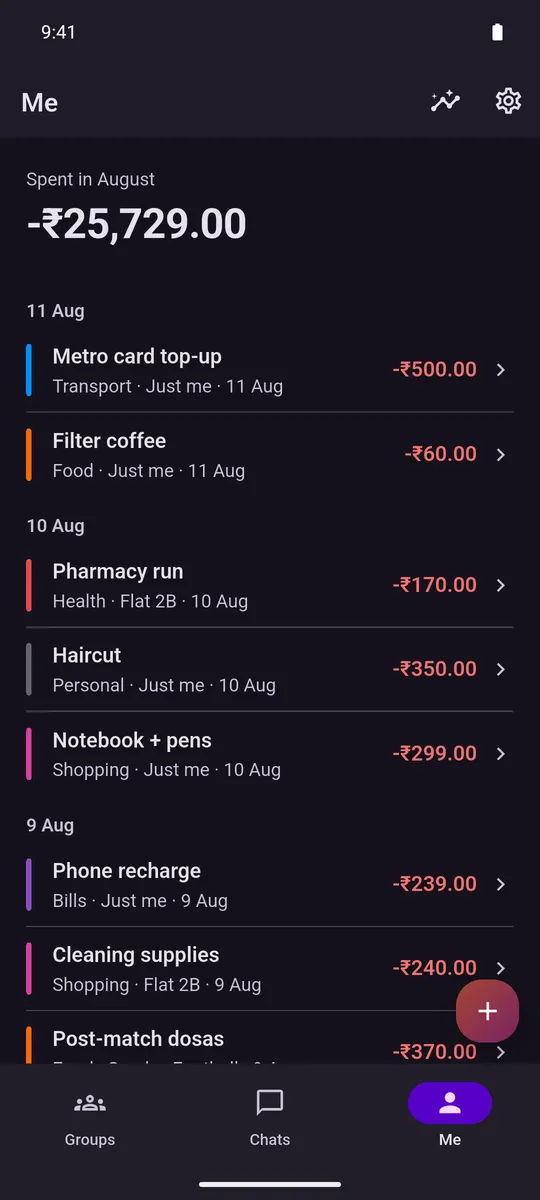
One ledger, group and solo
Your share of a group expense turns up in your own spending automatically — your share only, never the whole bill you fronted. It is the reason Splitmate exists: the Me tab already knows about the dinner you split on Tuesday, without you entering it twice.
- Pay for three people and your own spending goes up by a third of the bill, not all of it. The rest sits in the group as money owed to you, so a round you paid for does not look like a month of overspending.
- The Me tab is one month at a time: a single figure for what you spent, over a feed grouped by day, with solo and split entries side by side.
- Recategorise one of those mirrored rows and Splitmate stops overwriting your choice. Unlink it and it leaves the row alone permanently.
Split it the way it actually happened
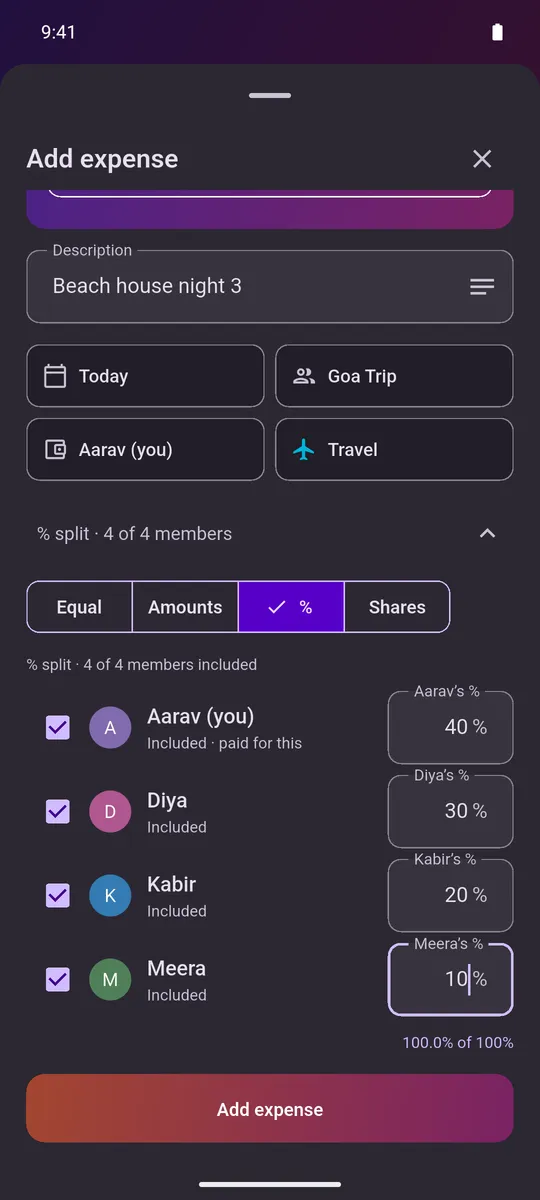
The amount comes first, entered on your phone’s own keyboard rather than one Splitmate draws — description, date, an optional note and a category follow it. Pick a date after today and Splitmate refuses it, both in the date picker and again if one slips through some other way.
- Equal, Amounts, % or Shares, across whichever members were actually there — in the group’s own currency, chosen from over 40 currencies.
- Every entry is either Just me or a group, picked from a single chip. The payer chip only appears once there is a group to pay for, and Splitmate will not save until you have said who paid.
- Type the description and a tinted category chip fills itself in — from your own past corrections first, a built-in keyword list second, and, only if neither has an answer, whichever category the group itself has spent on most. It never overrides a category you tapped yourself.
Settle up in fewer payments
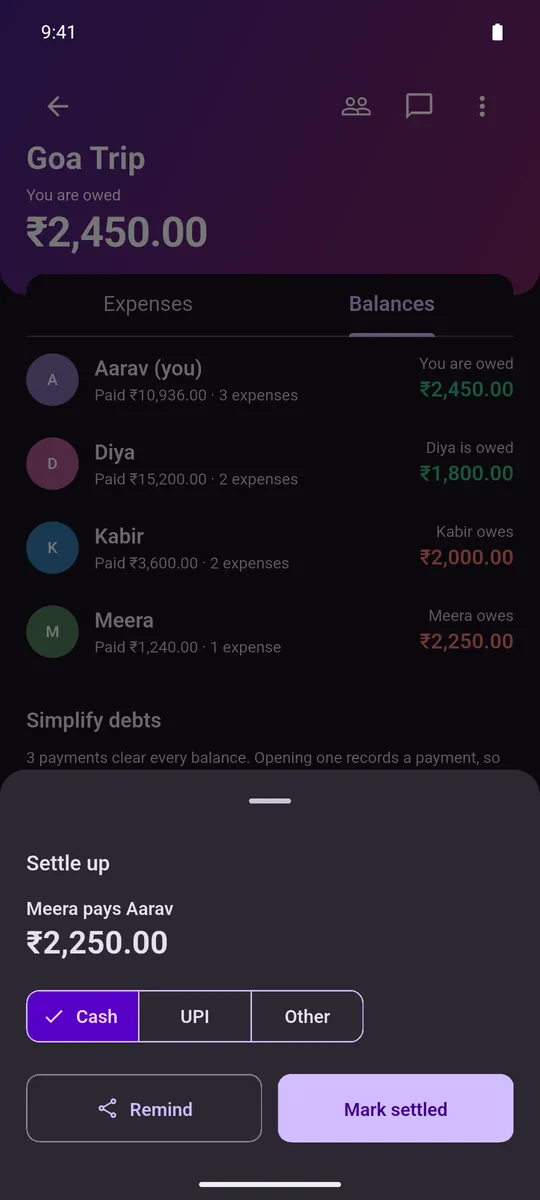
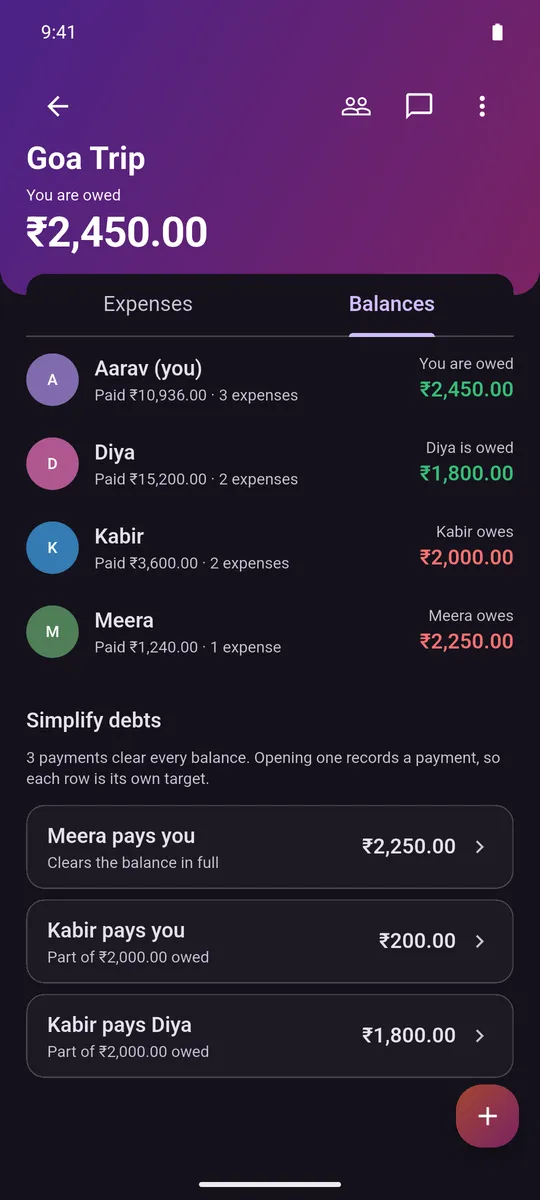
Splitmate works out who should pay whom so a tangle of balances clears in as few transfers as it can, then records the payment you actually made. It never moves money — and when the last balance reaches zero, the group throws confetti.
- The suggestion is computed on your own phone with no server involved, and it never needs more than one payment per person minus one. Every device in the group works it out identically, so nobody sees a different plan.
- Mark it settled with the method you actually used: Cash, UPI or Other. That is a label on a record of something that already happened, not a transfer Splitmate makes.
- Remind writes a ready-made message and hands it to your Android share sheet, so it goes out from WhatsApp or SMS under your name. Splitmate never sends anything itself.
A deadline you cannot quietly delete
Give a group a settlement date, an amount you are willing to be owed, or both, and anyone still short gets reminded. Then, for them, the settings lock.
- The lock needs two things at once: you owe money in that group, and a trigger is already live — the date has passed, or your debt is over the limit. Miss either and it is an ordinary editable form.
- Both arms lock together, because raising a threshold is exactly as easy as deleting a deadline. Editing the trigger away was the loophole; this is the thing that closes it.
- Reminders are local notifications the Android app schedules on your own phone — every four hours, daily, every two days, weekly, or a number of hours you pick with a floor of four — and none of them arrive between ten at night and eight in the morning.
Talk about it where the bill is
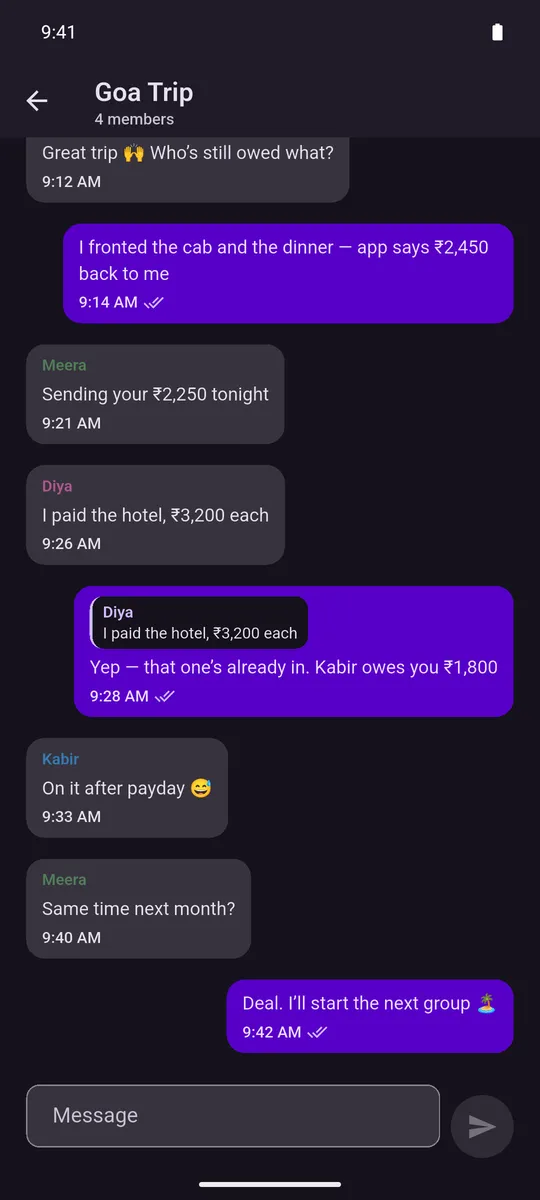
A thread for every group, and only groups: there are no one-to-one messages in Splitmate, so the only way anybody reaches you is a group you both joined. There is no user directory and nothing to search.
- Reply to a message, copy it, pin it to the top of the thread, or delete it for everyone, with typing indicators and delivery and read receipts on the ones you sent. Text only on either client, up to 2,000 characters — no voice notes and no files.
- A new message pushes a notification to the phone — unless you already have that thread open there, in which case it stays quiet. Open the thread the ordinary way and whatever was already sitting in the tray for it clears itself.
- Deleting for everyone leaves a tombstone rather than a hole: the text is erased on both sides and the row stays, so a conversation cannot be quietly rewritten. Messages are stored as ordinary text on the server behind access rules, and they are not end-to-end encrypted — treat a Splitmate chat like an ordinary group chat, not a secure messenger.
- Every group's chat is in the browser too, where Splitmate is groups only and every screen is read live from the server. Nothing is kept on that side, which is the difference worth knowing: a message that fails to send comes back into the box for you to try again, because there is no outbox to hold it and nothing to send it later.
One feed, not one per group
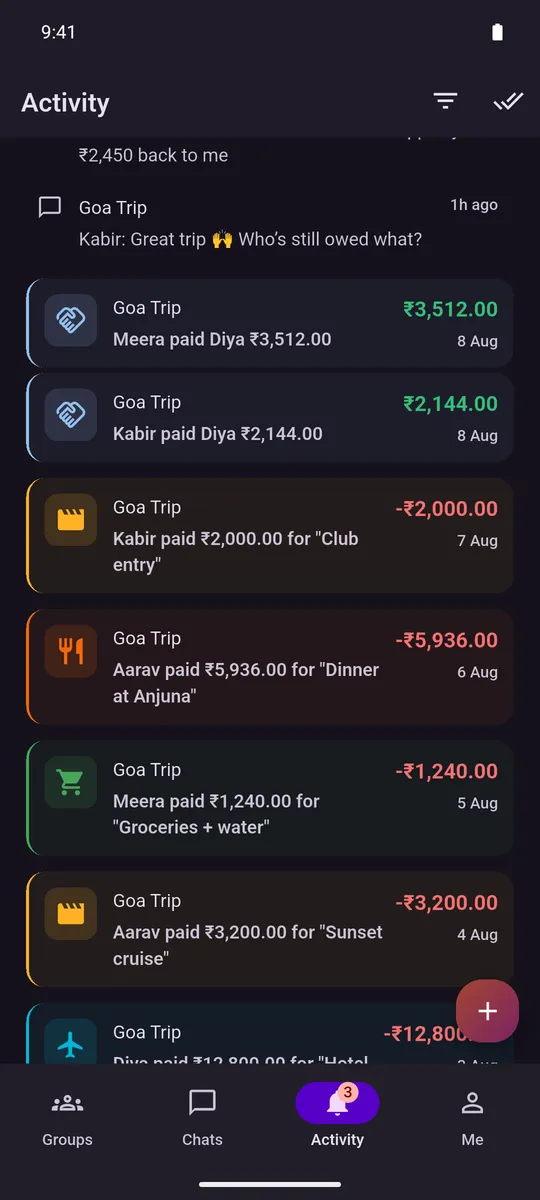
Every expense, settlement, chat message and membership change — across every group at once, not one at a time — lands in a single feed, newest first, grouped by month and then by which conversation it belongs to. It is a tab of its own, alongside Groups, Chats and Me, not a screen tucked inside one group.
- A row about money — an expense added, a payment settled — renders as a tinted card with a category icon and a right-aligned amount. A chat message or someone joining or leaving is a plain, uncoloured line with neither, so what actually cost something is what draws the eye.
- Filter by type, category or person, in any combination — picking a category shows only the matching expenses, and picking a person shows only their activity, across every group at once. Tap a row to jump straight to the group or thread it came from; that marks just the one row read, and a separate button clears everything else in one tap.
- The newest 500 events are kept. Past that, the oldest are dropped to make room for new ones — not archived anywhere, just gone.
- There is a feed in the browser too, and it is groups only. It is not this one arriving there: this one is a table on the phone that is never synced, so a second client has nothing to fetch and works out its own from the groups instead. Two feeds, not one seen twice — which is why what you have already read on one of them does not carry to the other.
Charts & export
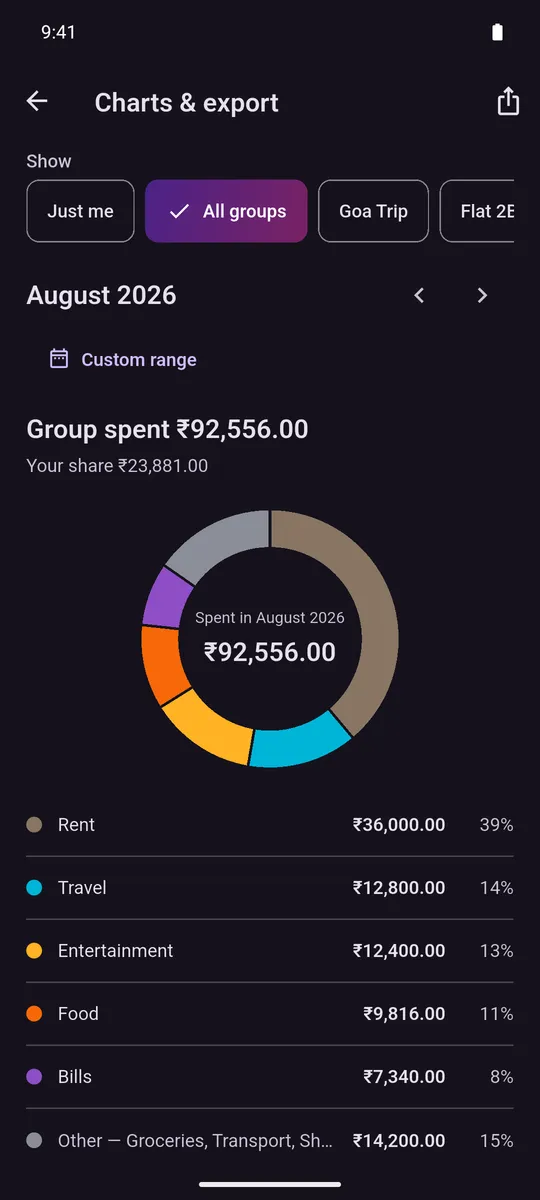
One screen off the Me tab, for the month you are looking at or any range you pick, filtered to just you, to all groups, or to one of them.
- A category donut whose legend adds up to exactly 100%. The percentages are apportioned against the total rather than rounded one by one, so they cannot quietly sum to 99.
- A cumulative trend line across the range, and — inside a single group — a bar per payer, so it is obvious who has been fronting everything.
- Export exactly what is on screen as a CSV: nine columns, ISO dates, and plain numbers a spreadsheet will read as numbers. On the phone it goes to the Android share sheet; the browser client downloads a file instead, for the one group you are looking at. Export only, in one direction; nothing comes back in.
No account, and nothing watching
No signup, no email, no password, no phone number, and no directory anyone can look you up in. You give it your name and a currency, and you are in.
- Expenses you log as Just me never leave the phone. They live in a database on the device, there is no cloud copy of them, and there is no code path in the app that would upload one.
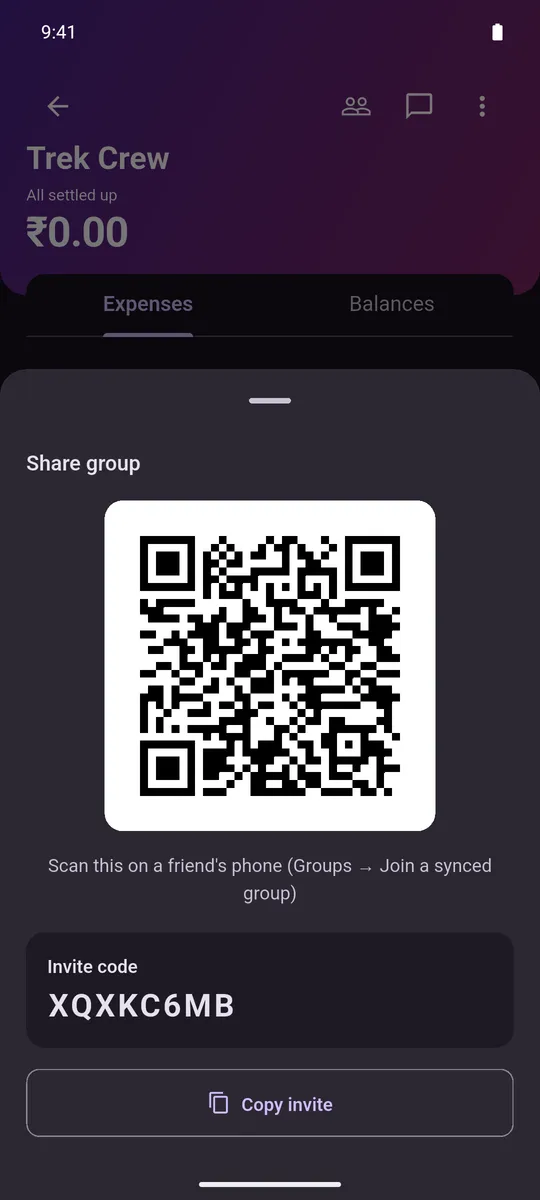
- Groups are the part that syncs: expenses, member names and profile pictures, settlements and chat go to the cloud, which is what lets everyone stay square. The ledger still works offline in between.
- Zero analytics, zero crash reporting, zero ads and no billing code — none of it is in the app’s dependency list at all, so there is nothing collecting anything about how you use it.
The other half
What Splitmate does not do
- There is no iPhone app, and none is planned. Splitmate is an Android app. On an iPhone you use the web client instead, and it is groups only: everything it opens hangs off a group you are already in, so there is no personal ledger in it — those expenses sit in a database on the phone, and no browser has a copy of that database. What the browser is, and is not
- It is not connected to your bank. Splitmate never moves money and nothing is ever paid from inside it. Settling up writes a row that records who paid whom, how much, and whether the method was Cash, UPI or Other — a label on a payment you already made somewhere else.
- It carries no exchange rates and does no currency conversion. A group counts in one currency, chosen when it is created, and a total across groups that do not agree is suppressed rather than added up.
- Splitmate does not scan receipts. You type the amount. There is no camera path into an expense and nothing to attach to one.
- There are no budgets and no recurring expenses. Nothing sets a limit, nothing compares against one, and every entry is one you added yourself.
- Export only — nothing comes back in. The spending screen writes a CSV out to the Android share sheet. There is no path in the other direction: no file picker on any entry screen, and nothing that reads a spreadsheet.
- Chats are text only — no voice notes, no files and no reactions. That is true of both clients, and so is the 2,000-character limit on a single message. Deleting one for everyone erases the words and leaves the row where it was, so a conversation cannot be quietly rewritten.
- There are no one-to-one messages. Every conversation belongs to a group, on both clients, so the only way anybody reaches you is a group you both joined.
- Messages are not end-to-end encrypted. They travel over an encrypted connection and sit behind server-side rules, and they are stored as ordinary text, which means we could read them if we looked. Treat a Splitmate chat like an ordinary group chat, not a secure messenger. The privacy page says it in full
Getting it
Two ways in, and neither one is a store
Splitmate has no public listing on Google Play, so there is nothing to search for and nothing on this site to download. The opt-in link puts your Google account on the tester list, and Play takes it from there. The second way needs no list at all and works in any phone browser — including an iPhone, since there is no iPhone app: open the web client and sign in with Google. It is groups only, and online-only.